
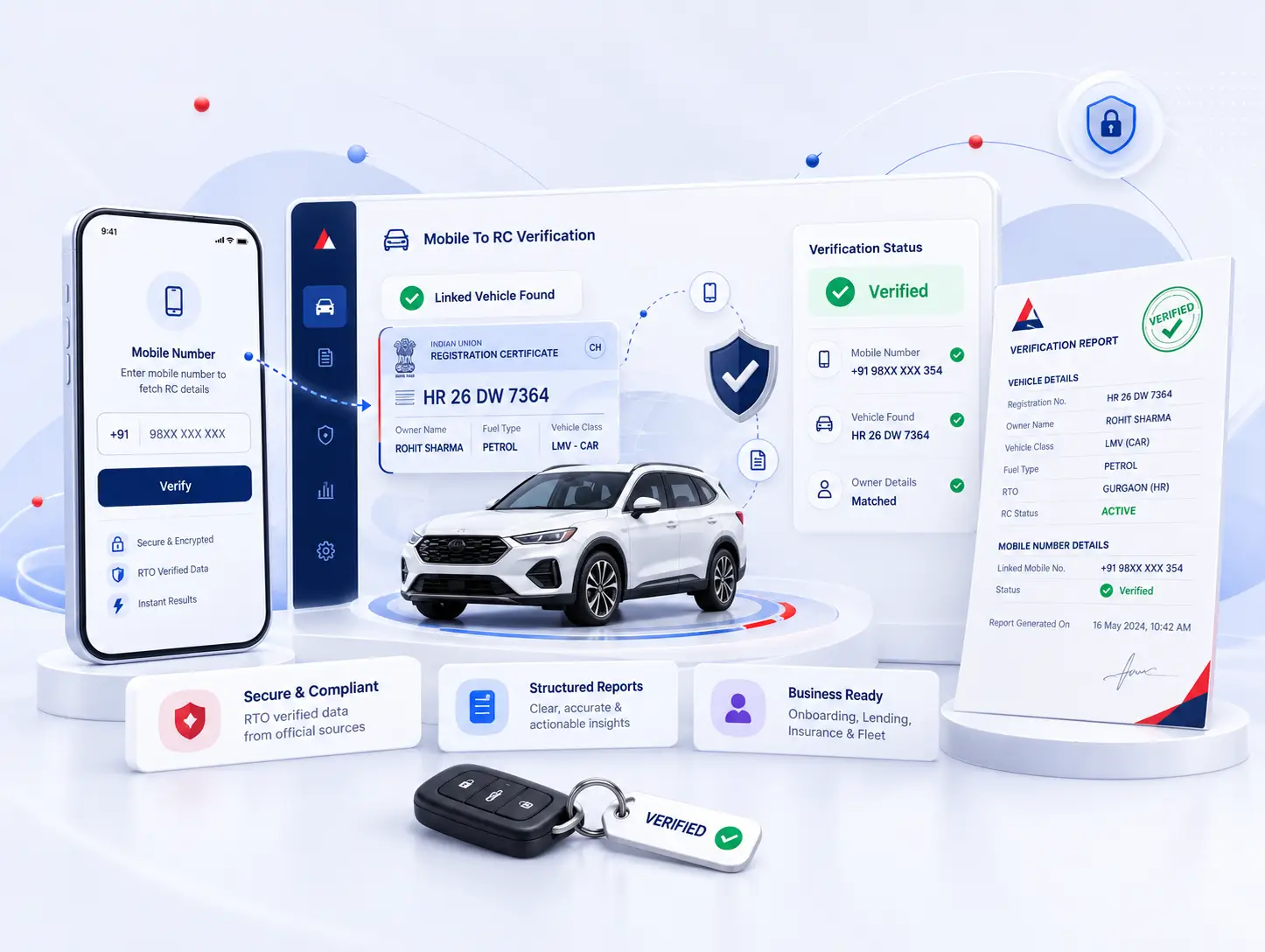
Mobile To RC Verification for Trusted Business Decisions

Verify vehicle registration (RC) details linked to a mobile number with confidence for onboarding, lending, collections, insurance, fleet checks, due diligence and compliance.

  • Faster screening
  • Structured reports
  • Approval based access
Vehicle verification dashboard preview

What you receive in every Mobile To RC verification

  • Mobile-linked RC lookup

    Use the submitted mobile number to check available linked vehicle registration details.

  • Vehicle registration details

    Review available registration number, vehicle make, model, fuel type and RC status in one place.

  • Faster vehicle screening

    Reduce manual vehicle searches during onboarding, lending, collections and verification workflows.

  • Structured verification report

    Download organised Mobile To RC verification details for internal records and business decisions.

  • Reduced manual checks

    Bring mobile and vehicle information into a single verification workflow to speed up review.

Mobile To RC Verification Result

Verified
Download Report
Mobile To RC verification report example
Mobile Number +91 98XXXXXX10
Registration Number HR XX XX XXXX
Vehicle Make MARUTI SUZUKI
Model BREZZA
Fuel Type DIESEL
RC Status ACTIVE

Status Verified
Verified On 16 May 2024, 10:42 AM
Reference ID MRC2405161042

How industries use Mobile To RC verification

Supporting mobile-linked vehicle and RC checks across business workflows.

Support lending and asset checks with mobile-linked RC details.

Financial teams can use Mobile To RC verification to identify linked vehicle registration details from a submitted mobile number during lending, collections and asset review workflows.

  • ✓Mobile-linked Vehicle Checks
  • ✓RC Detail Validation
  • ✓Vehicle Detail Review
  • ✓Asset Due Diligence

Vehicle Finance

Check linked RC details during lending workflows.

Risk Screening

Review mobile-linked vehicle details before approval.

Due Diligence

Check linked registration and vehicle attributes.

Vehicle Matching

Review mobile-linked RC and vehicle information together.

Credit balance and 20 complimentary credits

Get 20 complimentary credits after business approval

  • No upfront payment required
  • Start verifying immediately
  • Download structured reports
  • Use credits across all services

A simple Mobile To RC verification journey

1

Register Your Business

Create your business account to access Mobile To RC verification.

2

Submit Documents

Upload the required business documents for account verification.

3

Get Approved

Our team reviews and approves your business access.

4

Add Credits

Add credits to your wallet to begin Mobile To RC checks.

5

Verify & Download Reports

Submit a mobile number, review available linked RC details and download the structured verification report.

Why businesses choose Abhita for Mobile To RC verification

One Credit Balance
Enabled Services

Use a single credit balance for eligible services, including Mobile To RC verification.

Approval-based
Organisational Access

Give approved team members controlled access to Mobile To RC verification workflows.

Downloadable
Structured Reports

Download clear Mobile To RC verification reports for authorised internal review and records.

Central Transactions
& Activity History

Track Mobile To RC checks, reports and verification activity in one centralised place.

Secure Account
Access

Role-based access supports controlled handling of Mobile To RC verification activity and data.

Frequently asked questions

Who can use Mobile To RC verification service?

Mobile To RC verification is available through approved business accounts for organisations that need to check available vehicle registration details linked to a submitted mobile number as part of authorised business workflows.

When are the 20 complimentary credits activated?

The 20 complimentary credits are activated after your business account has been reviewed and approved.

Can I download Mobile To RC verification reports?

Yes. Mobile To RC verification results can be downloaded as structured reports for authorised internal records, screening and supported business workflows.

Does my business need approval before using Mobile To RC?

Yes. Access is approval-based. Mobile To RC verification becomes available after your business review and account approval process is completed.

What details are shown in a Mobile To RC verification report?

The report can show available vehicle registration details linked to the submitted mobile number, such as registration number, vehicle make, model, fuel type, RC status, verification status, verification date and reference ID.

Can my team access Mobile To RC verification?

Approved organisations can provide authorised team members with platform access through the organisational access available for the business account.

Business verification dashboard with secure shield

Start verifying through
a business-first platform

Secure. Reliable. Built for trusted businesses.